 Katerina Skroumpelou
a7563e9fe6
Katerina Skroumpelou
a7563e9fe6
* Use latest 2.x version of `@supabase/supabase-js` in all examples
* Use `latest` version of `@supabase/ssr` in all examples
* Remove lock files from examples
* Add examples lock files in .gitignore

The rationale is:
- Lock files are not actively maintained/updated (or the versions in the
package.json files for that matter)
- They pin an arbitrary version (from the end-user perspective)
- Removes the need to manually update the versions and reinstall
- Consistency

<!-- This is an auto-generated comment: release notes by coderabbit.ai
-->

## Summary by CodeRabbit

## Release Notes

* **Chores**
* Broadened Supabase SDK dependency version constraints across example
projects for greater flexibility with compatible updates
  * Updated some SSR package dependencies to track latest releases
* Added gitignore rules for dependency lock files in example directories

<!-- end of auto-generated comment: release notes by coderabbit.ai -->
Supabase Ionic React User Management
This project is based on the Supabase Ionic React user management Quickstart To keep it in sync with this Quickstart, architecture choices have been made to facilitate the comparison
This example will set you up for a very common situation: users can sign up with a magic link and then update their account with profile information, including a profile image.
This demonstrates how to use:
Technologies used
- Frontend:
- Ionic
- Capacitor
- React
- Supabase.js for user management and realtime data syncing.
- Backend:
- supabase.com/dashboard: hosted Postgres database with restful API for usage with Supabase.js.
Instant deploy
The Vercel deployment will guide you through creating a Supabase account and project. After installation of the Supabase integration, all relevant environment variables will be set up so that the project is usable immediately after deployment 🚀.
Build from scratch
1. Create new project
Sign up to Supabase - https://supabase.com/dashboard and create a new project. Wait for your database to start.
2. Run "User Management" Quickstart
Once your database has started, run the "User Management Starter" quickstart. Inside of your project, enter the SQL editor tab and scroll down until you see User Management Starter: Set up a Public Profiles table which you can access with your API.
3. Get the URL and Key
Go to the Project Settings (the cog icon), open the API tab, and find your API URL and publishable key (anon), you'll need these in the next step.
The publishable key is your client-side API key. It allows "anonymous access" to your database, until the user has logged in. Once they have logged in, the keys will switch to the user's own login token. This enables row level security for your data. Read more about this below.
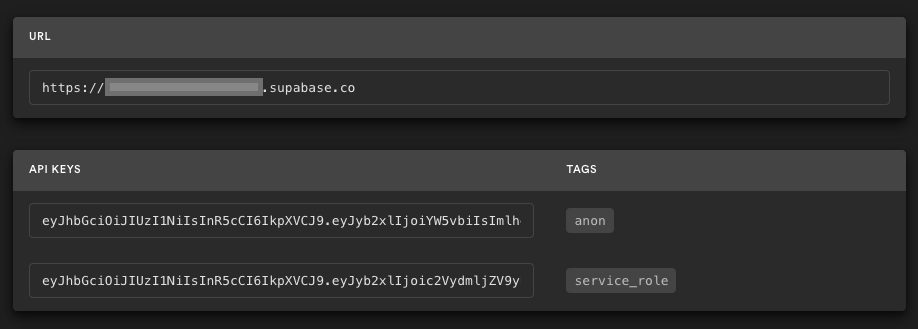
NOTE: The service_role key has full access to your data, bypassing any security policies. These keys have to be kept secret and are meant to be used in server environments and never on a client or browser.
4. Env vars
Create a .env.local file in the project root (or update your existing .env.local / .env file) and add:
VITE_SUPABASE_URL=YOUR_SUPABASE_URL
VITE_SUPABASE_KEY=YOUR_SUPABASE_PUBLISHABLE_KEY
Populate these variables with your project's URL and publishable key from the Supabase dashboard.
5. Run the application
Run the application: ionic serve and the browser will open to http://localhost:8100/ and you are ready to go 🚀.
Supabase details
Postgres Row level security
This project uses very high-level Authorization using Postgres' Role Level Security.
When you start a Postgres database on Supabase, we populate it with an auth schema, and some helper functions.
When a user logs in, they are issued a JWT with the role authenticated and their UUID.
We can use these details to provide fine-grained control over what each user can and cannot do.
This is a trimmed-down schema, with the policies:
-- Create a table for Public Profiles
create table profiles (
  id uuid references auth.users not null,
  updated_at timestamp with time zone,
  username text unique,
  avatar_url text,
  website text,

  primary key (id),
  unique(username),
  constraint username_length check (char_length(username) >= 3)
);

alter table profiles enable row level security;

create policy "Public profiles are viewable by everyone."
  on profiles for select
  using ( true );

create policy "Users can insert their own profile."
  on profiles for insert
  with check ( auth.uid() = id );

create policy "Users can update own profile."
  on profiles for update
  using ( auth.uid() = id );

-- Set up Realtime!
begin;
  drop publication if exists supabase_realtime;
  create publication supabase_realtime;
commit;
alter publication supabase_realtime add table profiles;

-- Set up Storage!
insert into storage.buckets (id, name)
values ('avatars', 'avatars');

create policy "Avatar images are publicly accessible."
  on storage.objects for select
  using ( bucket_id = 'avatars' );

create policy "Anyone can upload an avatar."
  on storage.objects for insert
  with check ( bucket_id = 'avatars' );
Authors
Supabase is open source. We'd love for you to follow along and get involved at https://github.com/supabase/supabase