 Ali Waseem
42b431a270
Ali Waseem
42b431a270
## I have read the
[CONTRIBUTING.md](https://github.com/supabase/supabase/blob/master/CONTRIBUTING.md)
file.

YES

## What kind of change does this PR introduce?

Feature — a set of new keyboard shortcuts for the table editor, along
with infrastructure to register, gate, and surface them.

## What is the current behavior?

Clicking into the grid "traps" the keyboard: Escape doesn't pop out,
there are no shortcuts for row selection / deletion / navigation, and
the search-tables input grabs focus on page load.

## What is the new behavior?

### New shortcuts (all scoped to the table editor)

| Keybind | Action | Surface |
|---|---|---|
| `Esc` | Exit grid selection — clears the highlighted cell and drops
focus back to the page | hotkey |
| `↑` / `↓` | Start grid navigation from the first cell when no cell is
selected | hotkey |
| `Shift+Space` | Toggle selection on the current row | hotkey +
checkbox tooltip |
| `Mod+A` | Toggle selection on all displayed rows (matches Excel) |
hotkey + header-checkbox tooltip + Cmd+K |
| `Mod+Shift+A` | Toggle selection on all rows in the table | hotkey +
"Select all rows in table" button tooltip + Cmd+K |
| `Mod+Backspace` | Delete selected rows | hotkey + delete-button
tooltip + Cmd+K |

### Infrastructure

- **Split registry** — table-editor shortcuts moved to
`state/shortcuts/registry/table-editor.ts`, spread into `SHORTCUT_IDS`.
Makes it easy to scope a runtime check to a specific surface.
- **`eventMatchesAnyShortcut`** (`state/shortcuts/matchEvent.ts`) —
queries the hotkey library's live `SequenceManager` so gated shortcuts
(`enabled: false`) are correctly excluded. Covered by
`matchEvent.test.ts`.
- **`handleCellKeyDown`** now calls `event.preventGridDefault()`
whenever the keystroke matches an active table-editor shortcut, so rdg's
"start editing on key press" default doesn't compete with shortcut
actions (e.g. typing `Shift+X` no longer opens edit mode with `X` as
input).
- **`<Shortcut>` / `<ShortcutTooltip>`** used on the header checkbox,
the per-row checkbox, the "Select all rows in table" button, and the
delete button — keybinds show up on hover (Linear-style) so users can
discover them without reading docs.
- **CSS** — `.rdg:not(:focus-within) .rdg-cell[aria-selected='true']`
drops the selected-cell outline whenever focus leaves the grid,
reinforcing the "you're out" feedback after `Esc`.
- **`useShortcut`** wraps the Cmd+K-registered action to close the
command menu after firing (previously menu stayed open after selecting
an action).
- **Search-tables input** no longer auto-focuses on load, so arrow
shortcuts work immediately without clicking out first.

## Additional context

Linear: FE-3057

### Test plan

- [x] Open any table → `↓` selects the first cell; subsequent arrows
navigate rows
- [x] `Esc` drops focus out of the grid and re-enables `↓` to re-enter
- [x] Click a cell → `Shift+Space` toggles that row's selection
(checkbox)
- [x] `Mod+A` toggles all displayed rows
- [x] With pagination + some rows selected → `Mod+Shift+A` toggles
"Select all rows in table"
- [x] With rows selected → `Mod+Backspace` deletes them (existing
confirmation flow)
- [x] Hover the header checkbox / per-row checkbox / delete button →
keybind tooltip after ~500ms
- [x] Cmd+K with selection → the relevant action shows up; selecting it
closes the palette and runs

<!-- This is an auto-generated comment: release notes by coderabbit.ai
-->
## Summary by CodeRabbit

* **New Features**
* Added table editor keyboard shortcuts for navigation, row selection,
and cell actions, with command-menu integration and visible shortcut
tooltips.

* **Improvements**
* Better keyboard handling in grid cells allowing external shortcuts to
override default behavior.
* Select-all/deselect-all toggle and improved select-row UX;
selected-cell styling no longer shows when grid loses focus.
  * Command menu now reliably closes before executing shortcut actions.
* Removed autofocus on the table editor search input for consistent
focus behavior.

* **Tests**
* Added unit tests covering shortcut matching and command-menu shortcut
behavior.
<!-- end of auto-generated comment: release notes by coderabbit.ai -->


Supabase
Supabase is the Postgres development platform. We're building the features of Firebase using enterprise-grade open source tools.
- Hosted Postgres Database. Docs
- Authentication and Authorization. Docs
- Auto-generated APIs.
- Functions.
- File Storage. Docs
- AI + Vector/Embeddings Toolkit. Docs
- Dashboard
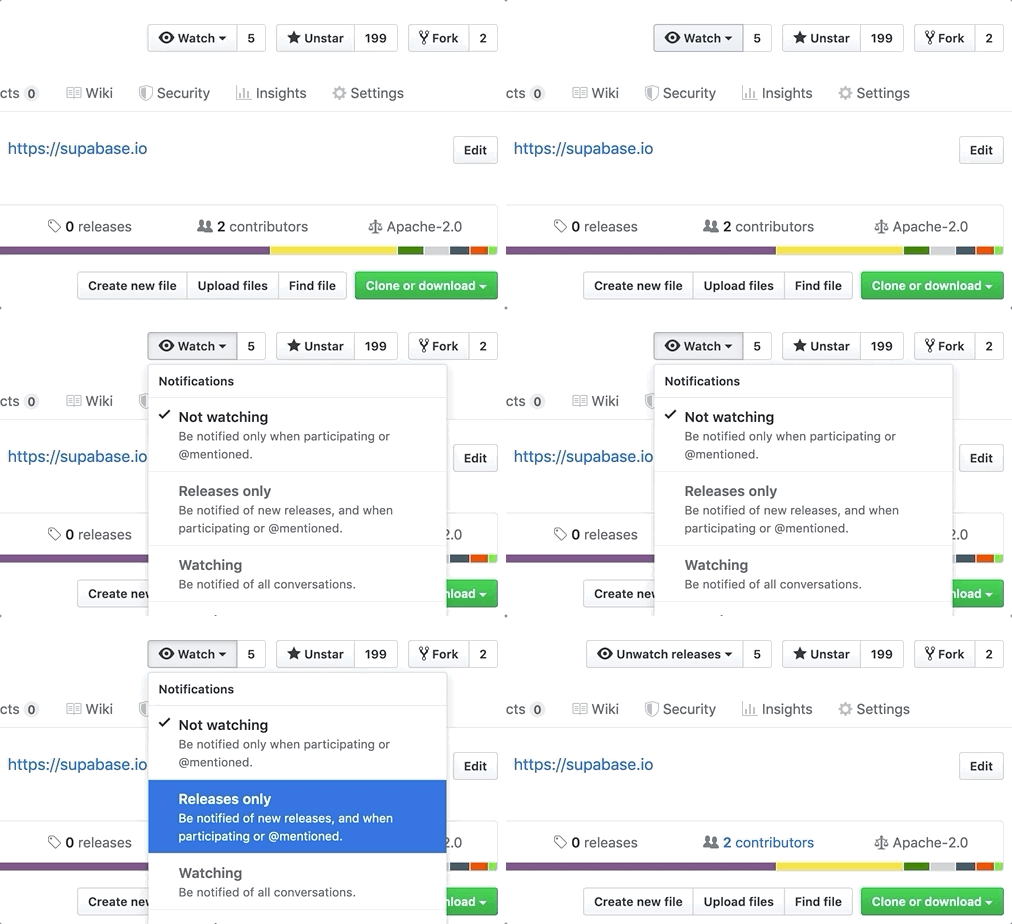
Watch "releases" of this repo to get notified of major updates.
Documentation
For full documentation, visit supabase.com/docs
To see how to Contribute, visit Getting Started
Community & Support
- Community Forum. Best for: help with building, discussion about database best practices.
- GitHub Issues. Best for: bugs and errors you encounter using Supabase.
- Email Support. Best for: problems with your database or infrastructure.
- Discord. Best for: sharing your applications and hanging out with the community.
How it works
Supabase is a combination of open source tools. We’re building the features of Firebase using enterprise-grade, open source products. If the tools and communities exist, with an MIT, Apache 2, or equivalent open license, we will use and support that tool. If the tool doesn't exist, we build and open source it ourselves. Supabase is not a 1-to-1 mapping of Firebase. Our aim is to give developers a Firebase-like developer experience using open source tools.
Architecture
Supabase is a hosted platform. You can sign up and start using Supabase without installing anything. You can also self-host and develop locally.

- Postgres is an object-relational database system with over 30 years of active development that has earned it a strong reputation for reliability, feature robustness, and performance.
- Realtime is an Elixir server that allows you to listen to PostgreSQL inserts, updates, and deletes using websockets. Realtime polls Postgres' built-in replication functionality for database changes, converts changes to JSON, then broadcasts the JSON over websockets to authorized clients.
- PostgREST is a web server that turns your PostgreSQL database directly into a RESTful API.
- GoTrue is a JWT-based authentication API that simplifies user sign-ups, logins, and session management in your applications.
- Storage a RESTful API for managing files in S3, with Postgres handling permissions.
- pg_graphql a PostgreSQL extension that exposes a GraphQL API.
- postgres-meta is a RESTful API for managing your Postgres, allowing you to fetch tables, add roles, and run queries, etc.
- Kong is a cloud-native API gateway.
Client libraries
Our approach for client libraries is modular. Each sub-library is a standalone implementation for a single external system. This is one of the ways we support existing tools.
| Language | Client | Feature-Clients (bundled in Supabase client) | ||||
|---|---|---|---|---|---|---|
| Supabase | PostgREST | GoTrue | Realtime | Storage | Functions | |
| ⚡️ Official ⚡️ | ||||||
| JavaScript (TypeScript) | supabase-js | postgrest-js | auth-js | realtime-js | storage-js | functions-js |
| Flutter | supabase-flutter | postgrest-dart | gotrue-dart | realtime-dart | storage-dart | functions-dart |
| Swift | supabase-swift | postgrest-swift | auth-swift | realtime-swift | storage-swift | functions-swift |
| Python | supabase-py | postgrest-py | gotrue-py | realtime-py | storage-py | functions-py |
| 💚 Community 💚 | ||||||
| C# | supabase-csharp | postgrest-csharp | gotrue-csharp | realtime-csharp | storage-csharp | functions-csharp |
| Go | - | postgrest-go | gotrue-go | - | storage-go | functions-go |
| Java | - | - | gotrue-java | - | storage-java | - |
| Kotlin | supabase-kt | postgrest-kt | auth-kt | realtime-kt | storage-kt | functions-kt |
| Ruby | supabase-rb | postgrest-rb | - | - | - | - |
| Rust | - | postgrest-rs | - | - | - | - |
| Godot Engine (GDScript) | supabase-gdscript | - | - | - | - | - |
Badges

[](https://supabase.com)
<a href="https://supabase.com">
  <img
    width="168"
    height="30"
    src="https://supabase.com/badge-made-with-supabase.svg"
    alt="Made with Supabase"
  />
</a>

[](https://supabase.com)
<a href="https://supabase.com">
  <img
    width="168"
    height="30"
    src="https://supabase.com/badge-made-with-supabase-dark.svg"
    alt="Made with Supabase"
  />
</a>
Translations
- Arabic | العربية
- Albanian / Shqip
- Bangla / বাংলা
- Bulgarian / Български
- Catalan / Català
- Croatian / Hrvatski
- Czech / čeština
- Danish / Dansk
- Dutch / Nederlands
- English
- Estonian / eesti keel
- Finnish / Suomalainen
- French / Français
- German / Deutsch
- Greek / Ελληνικά
- Gujarati / ગુજરાતી
- Hebrew / עברית
- Hindi / हिंदी
- Hungarian / Magyar
- Nepali / नेपाली
- Indonesian / Bahasa Indonesia
- Italiano / Italian
- Japanese / 日本語
- Korean / 한국어
- Lithuanian / lietuvių
- Latvian / latviski
- Malay / Bahasa Malaysia
- Norwegian (Bokmål) / Norsk (Bokmål)
- Persian / فارسی
- Polish / Polski
- Portuguese / Português
- Portuguese (Brazilian) / Português Brasileiro
- Romanian / Română
- Russian / Pусский
- Serbian / Srpski
- Sinhala / සිංහල
- Slovak / slovenský
- Slovenian / Slovenščina
- Spanish / Español
- Simplified Chinese / 简体中文
- Swedish / Svenska
- Thai / ไทย
- Traditional Chinese / 繁體中文
- Turkish / Türkçe
- Ukrainian / Українська
- Vietnamese / Tiếng Việt
- List of translations